
Nobody spoke for 2.8 seconds
Say your team borrows a tool that makes short explainer films. You give it a topic. It gives you back a film with a voice and captions.
Out of the box, the film opens on a title card. Nobody speaks for 2.8 seconds.
Nothing is broken. That is just how the tool was set up. Someone chose that opening for their own films, and it came to you with everything else.
We changed two settings and took the title out. Now the first word comes about a quarter of a second in.

That was one of six settings we changed. The way the tool works held up well.
You will meet that gap every time your team borrows an AI tool.
What we tried
The tool is anything2explainer, a skill published on GitHub by Vincentwei1021 (Vincentwei1021/anything2explainer). A skill is a folder of instructions and scripts that an AI agent reads before it starts work.
Inside is a video template built on Remotion, plus scripts for the voice, captions and checks. The instructions are in Chinese. Every film gets the same look: white line drawings on black, a touch of purple and captions on the picture.
On 19 October I had AI agents use it on three topics, on my own computer. The undersea cables film came out at 1 minute 27 seconds. The shipping container film ran 1 minute 50 seconds, plus eight cards to swipe through. A fable about a city where every window waits for its neighbour ran 1 minute 36 seconds.
One AI agent made each film. A lead agent played the director. A separate AI reviewer, on a different model, checked each film. All three passed. The fable passed first time. The others needed one or two rounds of fixes.
So, the limits. Nothing has been posted. We have not tested the films on real viewers. The reviewers said they would stop scrolling, but they are AI agents, not people. We made the films for this test, not for a client.
What worked
Three parts are worth borrowing.
It stops and asks a person. The skill pauses four times. You agree the length and language, approve the words, choose a voice, then watch the first 30 seconds. Here, the lead agent answered for me, from my brief.
The last pause is the cheap moment to change your mind. Only 30 seconds of film exist.
It paid off on the fable. The draft showed two small windows for about 20 seconds. At the 30-second look, the director asked for the whole city. The agent changed it before making the rest.
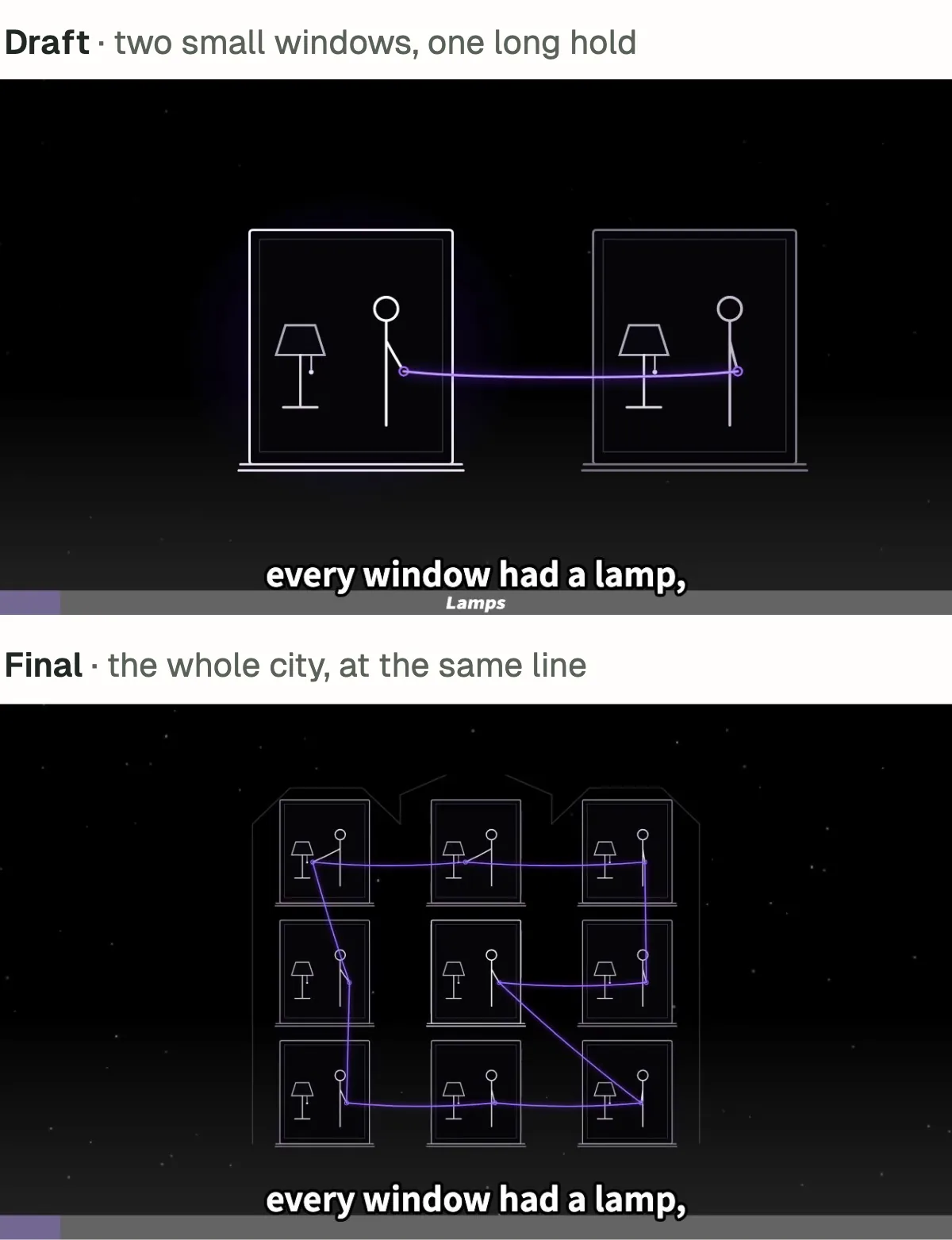
Captions timed to the voice. The scripts make the voice one line at a time. Then they time each caption to its own line of speech. The reviewers measured two of the films. At every sentence start they checked, the caption landed within a tenth of a second of the voice.
Checks that found real problems. Before the final video is made, a script looks for stretches where nothing moves. It found some in all three films. The longest was 9.4 seconds of stillness in the fable. The agents fixed every one, and the checks then passed.
One catch. These scripts can report a pass and print a warning at the same time. Someone has to read what they say.
Six settings we had to change
The way it works was good. The settings it came with were someone else's.
| Setting | What it did | What we did |
|---|---|---|
| Slow start | A title card and 2.8 seconds of silence before anyone speaks | Changed two settings and took the title out |
| Tool credit | A line on the closing card crediting the tool | Emptied it |
| Black layers at the end | Two black layers covering the final shot | Removed them from all three films |
| Hidden file details | Traces of the video software inside every file | Saved the sound again cleanly and removed the colour profile |
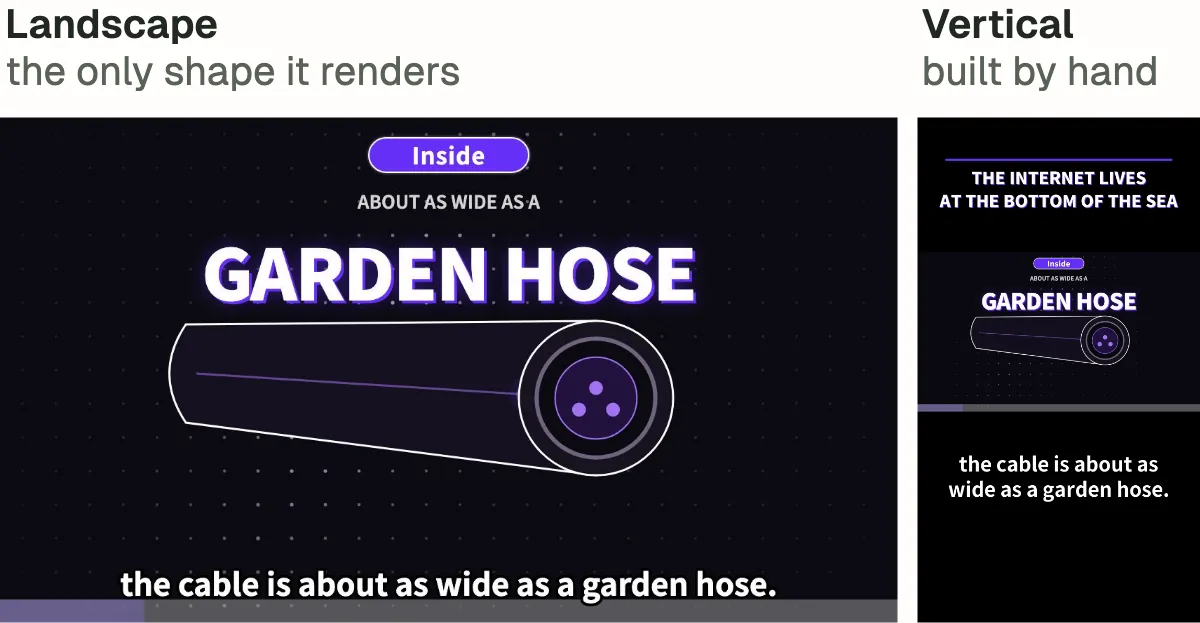
| One shape | Wide only, 1280 by 720 pixels | Made a tall version of the cable film by hand |
| Voice | An English voice graded D on its maker's own list | Chose voices graded A and B minus |
Two were quick. We emptied the credit line on the closing card. We removed the two black layers over the final shot.
These were six choices, not six bugs. A credit line helps the tool's author. A title card suits a lecture. One wide size suits a video website.
Our films were for social media, watched on phones. So each setting needed someone who knew that audience to decide.
The voice was an easy swap. The default English voice is graded D on the voice maker's own list (VOICES.md). We chose voices graded A for the two factual films and B minus for the fable.
The shape took real work. The template only makes wide films, 1280 by 720 pixels. For the tall version, the agent made the cable film again without captions. Then it set the picture across the full width and added all 41 captions back in large type.
The problem nobody could see
Last week I wrote about checking every frame of an agent-made video. This time the worst problem was not in any frame at all.
The software that made the videos left traces inside every file. The sound carried a version label from the software that saved it. The video files and poster images carried a colour profile with another company's name in it. A colour profile is a small note that tells a screen how to show colour. A viewer would never see either trace. Anyone who looked inside the file could.
That company's name was stored in a way a simple text search skips. The agents' own checks missed it. So did the checklist the lead agent gave them. Three of these traces were caught only by the separate reviewers. The fix was small: save the sound again cleanly and take the colour profile out.
Then a separate fact check caught mistakes the film reviewers had passed. One of the cards said "one steel box". The sources disagreed about the metal, so we took the word out.
Each new pair of eyes caught something the last one had passed.
Before your team uses a borrowed tool
If your team borrows AI tools, expect this. A skill, a template or a starter kit comes in two parts.
The first part is how it works. That is the part worth borrowing. Here, it was the pauses for a person, the captions timed to the voice and the checks for still stretches.
The second part is the settings it came with. Your brand, your audience and the places you post are not in them.
Every setting a tool comes with is a choice someone else made for their own work.
So before your team starts using a tool, do five things.
- List the settings it came with. The opening, the ending, credits, file details, shape and voice. Whatever the tool decides when nobody tells it.
- Give each one an owner. Someone who knows where the work will go decides to keep it or change it.
- Put a person at each pause. The early look is when changing direction is cheap.
- Check the file, not just the picture. Ask someone who did not make it to look at what goes out.
- Read the licence first. Do it before anyone plans a campaign around the tool.
Where could films like these fit? A content team could explain how one thing works, with a source behind each number. How a payment clears, for example. That means a film of 90 to 120 seconds, plus a set of cards that needs its own layout step. A course creator's fact sheet can double as the list of sources. An agency could make quick first drafts in one house style. The shape, the hidden file details and the slow start would still need fixing after.
Then the licence. anything2explainer uses the PolyForm Noncommercial licence (its licence file). Noncommercial use is free. Any commercial use of the toolkit needs the author's permission first. So a business cannot run these films as its own ads without it. The template also uses Remotion. Remotion is free for individuals and for companies of up to three employees. Bigger for-profit companies need a Remotion company licence.
For most UK software businesses, that makes this a tool to learn from first. Or one to license properly before it goes near your marketing.
A fable about going first
The third film is a fable. In this made-up city, every window had a lamp, but no one would be first. The rule was simple: "After you."

It is a story, not evidence. But you may know a team like this. Everyone is ready to change how they build. Everyone is waiting for someone else to go first.
In the film, one figure loosens the knot that holds it back and lights its own lamp. Then the neighbour's lamp comes on.
Where to start
If your team is borrowing AI tools, bring one to a free 15-minute call. After the call, we work through what it needs with you. That means the settings to own, where a person should pause the work and who checks the result. Then you get a proposal with a custom quote.
You already know which tool your team keeps meaning to try.
In the fable, one lamp was enough to start the others.
Someone has to light the first one.
We read the anything2explainer repository at its 18 September 2026 version, and checked its licence, on 19 October 2026. We made the three films for this test on one computer, with no paid API, key, login or cloud voice. None has been posted.