The price was right in the end
Say you sign off a short video ad. A candle, a caption, a price card. The card lands on $28, the approved price. The last frame is right, so you approve it.
Before that, for just over half a second, the card showed unapproved prices: $10, then $12, $14, $15 and on up to $27. Seventeen frames, and nobody approved any of them.

That ad came from a test I had AI agents run this week. They used an open-source tool to turn plain text into branded video. The videos looked finished. Some of the frames inside them were wrong.
What this test was, and what it was not
I had two AI agents build two kinds of video. A separate AI reviewer, running on a different model, then checked their work. Both builders said their tests passed. The reviewer disagreed with both.
So, the limits first. Every company, product, price and release note was made up. The films are silent. The judges were AI agents looking at still frames, not people watching. Nothing here shows that people understood these videos, liked them or bought anything. It shows no time saved against a real team either.
What it does show is useful. An agent can now turn a structured text file into repeatable, branded video. And "the final frame is right" is not the same as "every frame is right".
What Motionmaxxing does
Motionmaxxing is a skill for AI coding agents, made by Tejas Makwana and published on GitHub under the Apache 2.0 licence (Tejashmakwana/motionmaxxing). A skill is a folder of instructions and scripts an agent reads before it starts work.
This one teaches motion design: how things should arrive, land and cut. The agent builds each scene as a web page, then renders it to video on your own computer with Chrome and ffmpeg. It checks the result against six gates, G0 to G5, rather than just saying it came out well. Four gates are scripts; two are judged by eye (the project's README). Its author calls it an early release.
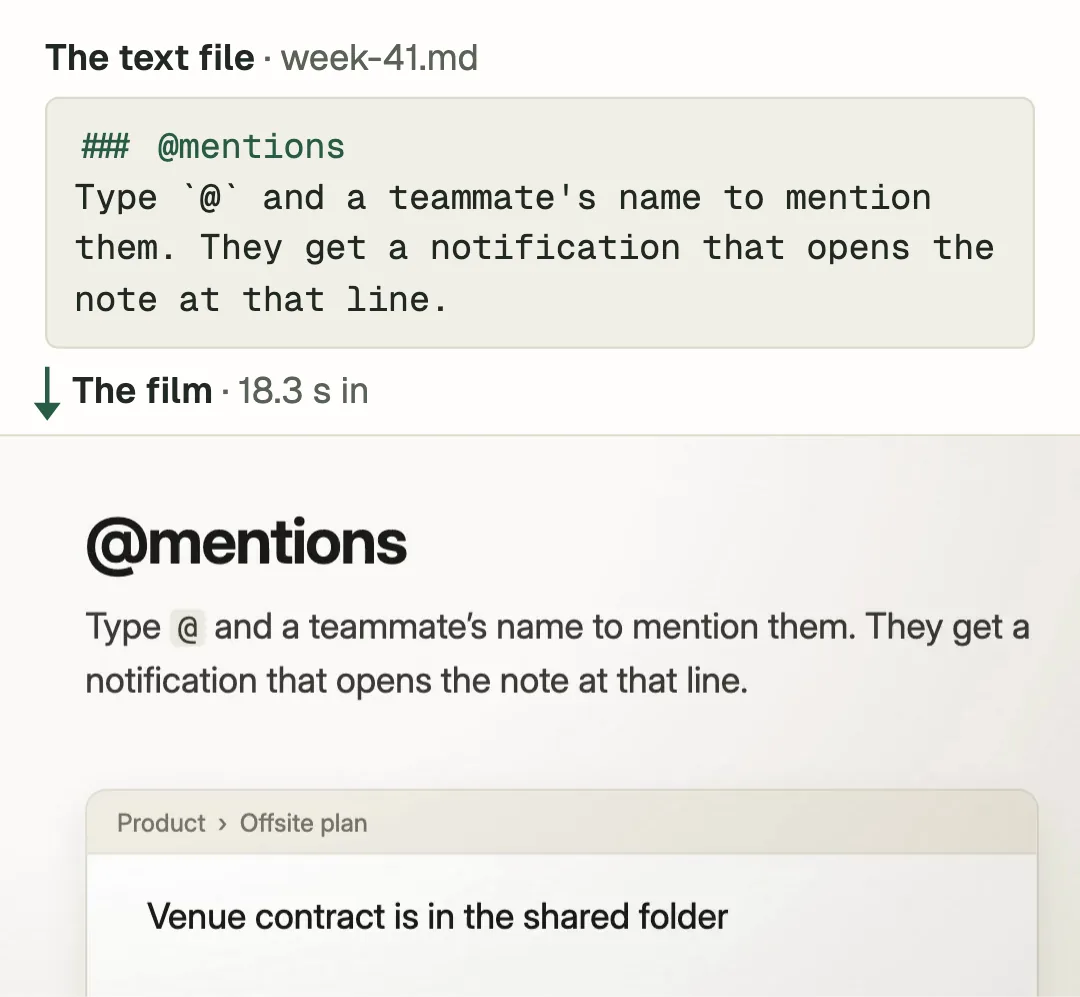
The useful part for a business is the split. Your words live in one plain text file, such as a week's release notes. The design lives in the code. Change the file and you get a new film in the same style.
Four weekly films from four text files
The first test was a weekly product update. A made-up note-taking app, Northwind Notes, had four weekly digests of release notes. Each had three new features and a few small fixes.
The agent built one film format and fed it all four digests. Out came four square films, 1080 by 1080 pixels, each 49.33 seconds long.
Much of it held. All four films passed the four scripted gates. Three check that a film plays and moves, has no dead stretches and ends briskly. The fourth is a narrow layout check, and it skipped much of the note on screen. In the film's code, every feature name, description and fix matched its digest: 40 of 40, once one curly apostrophe counted as a straight one. That checks the code, not every word as it appears on screen. A separate AI agent saw eight stills from each film and was asked what was new. It named all 12 features.
But every film broke a rule the skill sets for itself. Text in the product shots should be at least 4% of the frame's height (gate G1 in the README). In a 1,080-pixel frame that is 43.2 pixels. The reviewer found proof text below that in every film, from 30.26 to 42.21 pixels.
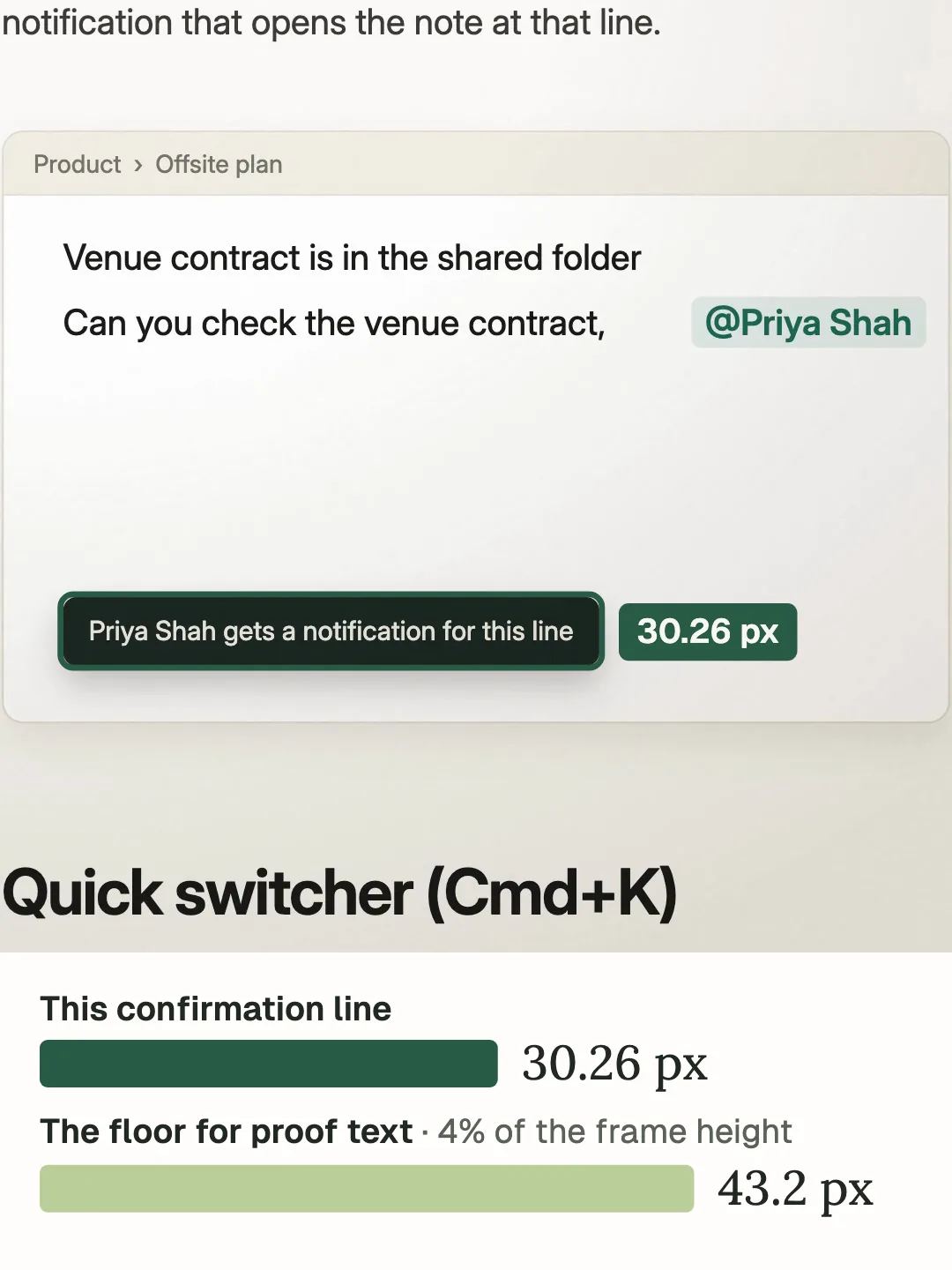
The headings were large, which is how the quiz agent named every feature. The small print, the part that proves the feature works, was too small. An agent reading headings from stills is not a person reading a pop-up on a phone.
Source: an independent review of the four films on 15 October 2026, by a separate AI agent on a different model. It reran the scripted gates, decoded every film, looked at the proof frames and measured their text. The review records are private test files.
How long did a film take?
It depends which clock you use.
Nobody ran a timer. The builder rebuilt its times afterwards from file timestamps. On those, the first film took 22 minutes 36 seconds from the start of setup to its final check. Each of the next three took about three minutes. Averaged across all four, that is about eight minutes a film.
All three numbers are true. They answer different questions. The first is what one film costs from cold. The second is what a repeat costs once the format exists. The third is an average that hides both.
The test asked for every film in 20 minutes or less. Charge the setup to the first film, and it missed.
Six ads, and a judge that liked one style
The second test was short vertical ads, the 9:16 shape made for phone screens. Six invented products shared one claims file, holding each product's approved price, captions and call to action.
Each clip was made twice. Version A used Motionmaxxing. Version B was deliberately plain, with the same words and simple fades. That made 12 videos.
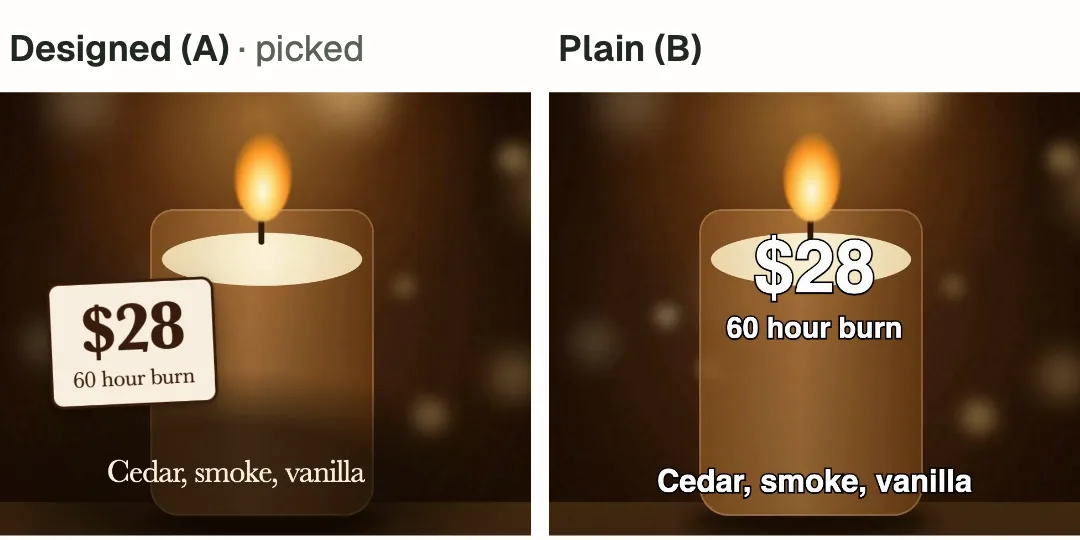
One AI judge saw pairs of stills without being told which version was which. It picked the designed version every time, 12 of 12 pairs, two pairs per clip. Its reasons were type, colour, how the offer stood out and how the brand held together. And once the words stopped moving, all 53 approved claims matched the claims file exactly.
Read the denominator, though. One judge. Six clips. Stills, not motion. And the plain version was built to be plain, so it was an easy win.
Then the reviewer checked every piece of text, what it said and where it sat, at the time of every frame. Two problems appeared.
The first was the prices. All six designed clips counted their price up from a lower number. Across the six, that put prices nobody approved on screen for 100 frames. The candle at the top of this article shows $10 at 3.6 seconds before it lands on $28. The plain versions showed none.
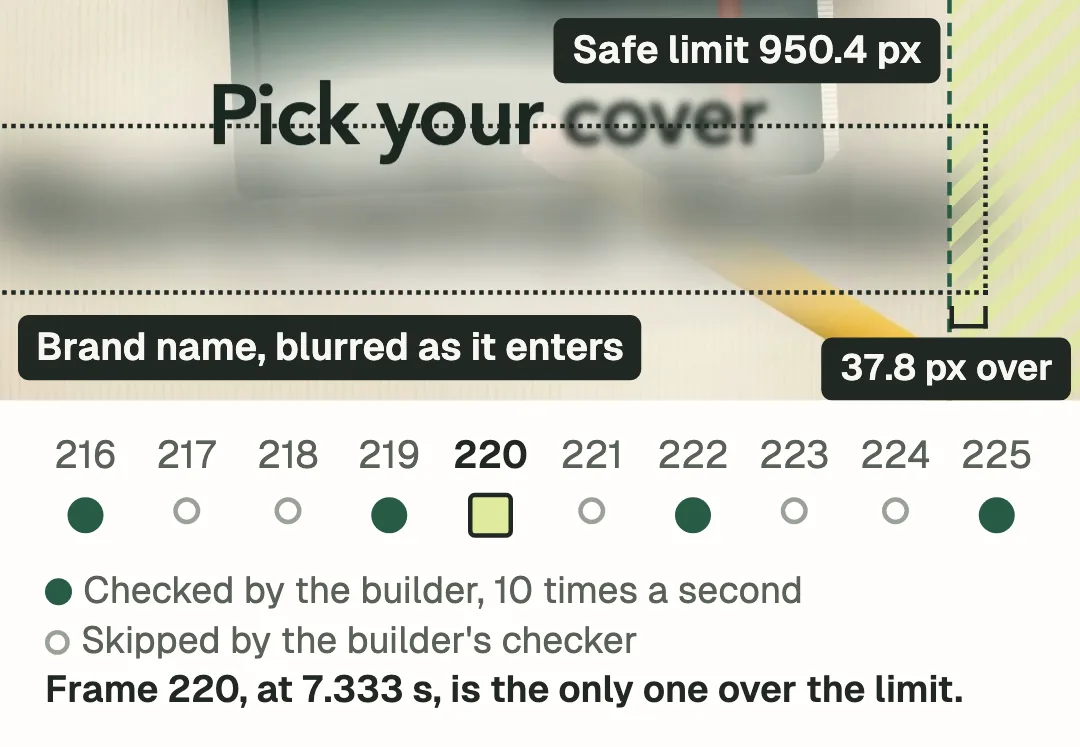
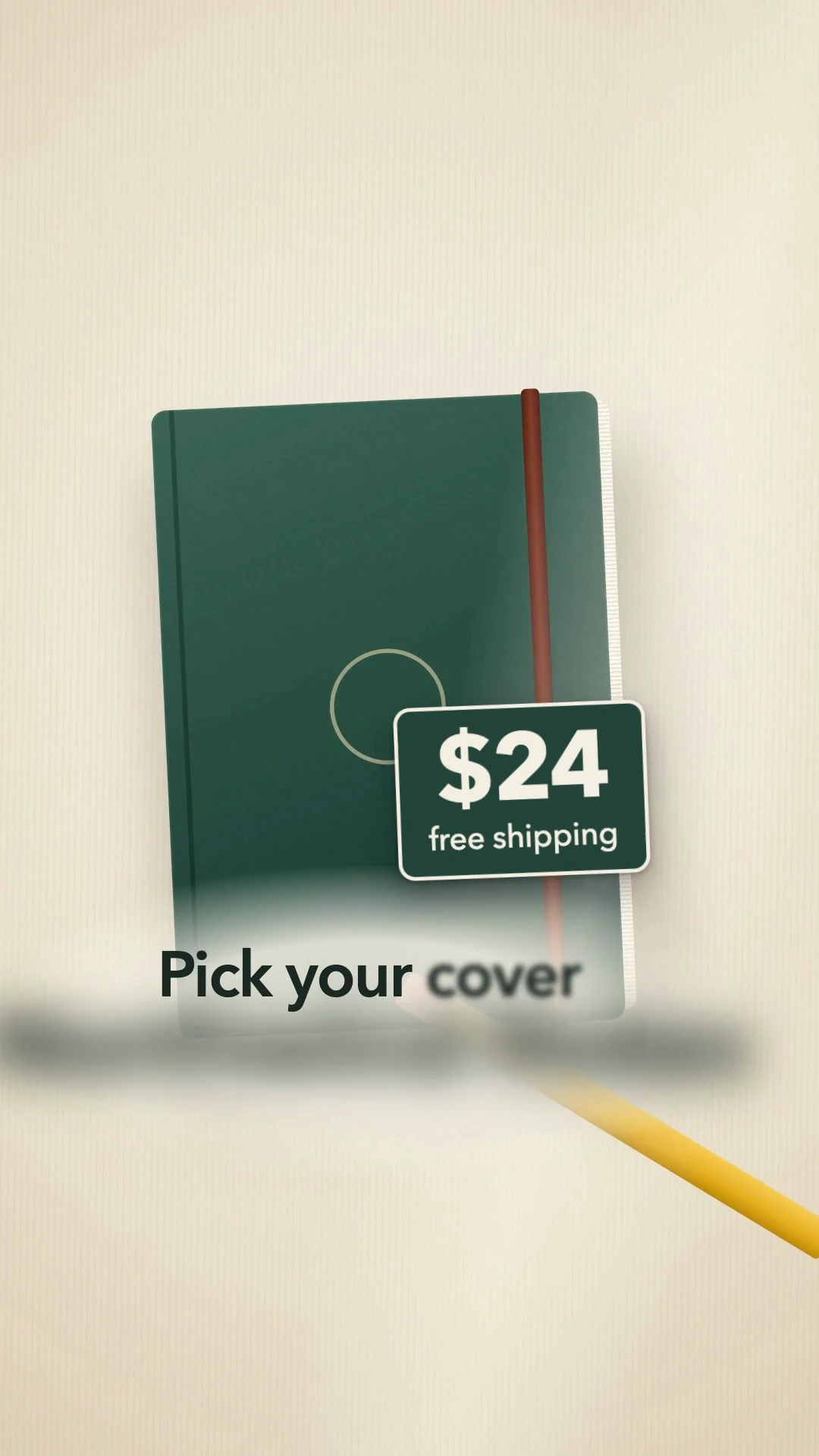
The second was the safe zone. Phone apps can lay their own buttons over the right-hand side, so the test kept text out of a strip there. Nothing was to cross 950.4 pixels in a frame 1,080 pixels wide. In one clip, for one frame, the brand name crashed in oversized and blurred. Its text box reached 988.2 pixels, 37.8 past the line.
See frame 220 whole, without the drawing on top.
Why the checks missed both
Neither problem showed up in the builders' own checks. Both slipped through gaps between frames.
The ads run at 30 frames a second. The builder's layout checker looked 10 times a second, so it saw every third frame and skipped the other two. Frame 220, at 7.333 seconds, was one it skipped. On the frames either side that it did check, the brand was either not there yet or already back inside the line.
The price check had a different blind spot. It compared the text with the claims file only once the text had stopped changing. A counting price keeps changing until it lands. So the check read $28, matched it and passed.
A check that waits for the text to stop moving will never see the wrong price.
The reviewer found both by checking every text box, its words and its position, at the time of every frame. Then it confirmed each problem in the decoded frame. That turned the designed clips' safe zone result from 6 of 6 into 5 of 6, while the plain ones kept 6 of 6. And the rule that only approved prices appear went from a pass to a fail on all six designed clips.
Even the contrast check needed a careful read. It failed every plain version, but it ignored their black text outline, which is there to make words stand out. A measure can pick the winner before anyone looks.
The reviewer's own check had limits too. It measured text boxes, not pixels. So it cannot see blur spreading past a box, text cut off at an edge or text hidden behind something.
Source: an independent review of the 12 ad videos on 15 October 2026, by a separate AI agent on a different model. It reran the builder's checks, tracked every text box frame by frame, re-scored the judge's votes and decoded the problem frames. The review records are private test files.
The whole result, with its denominators
So the scorecard is mixed. The production worked. The checks needed to be stricter, and nobody has tested the films on people.
| What was checked | Result | Judged by |
|---|---|---|
| Changelog films play, move, end briskly, pass a narrow layout check (G0, G2, G3, G5) | 4 of 4 pass | Scripts |
| Proof text at least 43.2 px (G1) | 0 of 4 pass | Reviewer, by eye, with measurements |
| Film code text matches the digests | 40 of 40 | Script, source strings after one apostrophe fix |
| Features named from stills | 12 of 12 | One AI agent, 8 stills a film |
| Designed ad picked over plain | 12 of 12 pairs | One AI agent, stills only |
| Settled ad source text matches the claims file | 53 of 53 | Script |
| Text boxes inside the safe zone at every frame time | 5 of 6 designed, 6 of 6 plain | Reviewer, text boxes, not pixels |
| Only approved prices in the text at every frame time | 0 of 6 designed, 6 of 6 plain | Reviewer, confirmed in decoded frames |
| Human audience testing | Not tested | None run |
What to do if you try this
For weekly product videos or ad variants, the approach is worth a trial. The format held, and one text file made every check possible. Before real customers see it, I would change six things.
- Keep prices literal. Animate the card, not the number. A price, date or percentage should show its approved value in every frame.
- Check every encoded frame. Decode the finished video and test each frame, entrances and exits included: the words against the approved list, every text box against the safe zone.
- Test the checker first. Plant a few faults on purpose: a wrong price for one frame, one frame over the safe line. If your checks pass any of them, fix the checks.
- Set the timer before you start. Write down when the clock starts. Report the first film, a repeat and the batch average as three numbers.
- Know who judged. One AI agent looking at stills is a first check, not an audience. Before you claim people understand a video, show it to some on a phone, at real speed, and ask what they saw.
- Read the licences. Motionmaxxing itself is Apache 2.0. It bundles GSAP, an animation library whose own licence is not open source (the project's NOTICE file). Read that before any commercial use.
Then decide who signs off. It should be whoever owns the claims, often your marketing or product lead. They approve the claims file before the render and read the every-frame report after. Watching the final frame is not a sign-off.
Where to start
If you want videos made this way, bring the idea to a free 15-minute call. After the call, we map what the feature needs with you: the text files, the checks and who signs off. Then you get a proposal with a custom quote.
You already have the words. They are sitting in your release notes.
Start there.
The Motionmaxxing repository and its licence files were checked on 15 October 2026. The companies, products, prices and release notes in the tests are invented.